Preview. Read-only while we test the idea.
Still Kicks
Logitech MX Master 2S
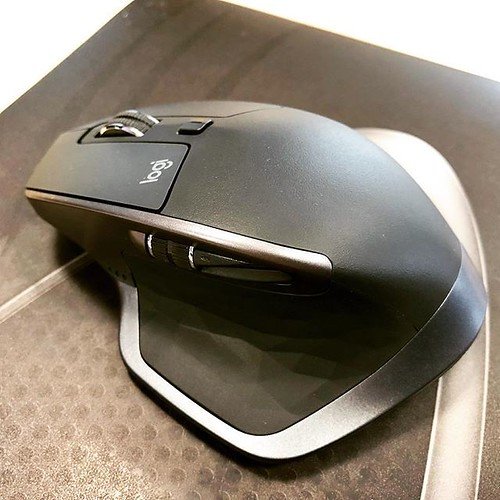
Photo: HighTechDad, CC BY 2.0, via Flickr. Source

Keyboards and mice beta · Logitech

Logitech MX Master 2S

Owners keep this mouse for years of heavy daily work, valuing the ergonomic shape above almost everything else, though the companion software is a recurring frustration they route around.

Read from 17 owner accountsUpdated September 24, 2026Thin evidence: 17 owner accounts so far, fewer than the 40 we want before we trust a pattern.Compare it

What keeps coming up

Owners who do long sessions at a desk, including engineering and CNC work, report no hand fatigue or soreness after eight to ten hours of continuous use. Several have run the same unit for three, six, or more years without a physical complaint about the shape.

Recurring in 3 of 17 accounts · See accounts

What keeps coming up against it

Logi Options, the companion software, is a clear complaint. Owners run into spinning-wheel bugs on Apple Silicon, describe reinstalling and purging every related file as a required ritual, and at least one owner abandoned the app entirely in favor of a paid third-party alternative.

Recurring in 4 of 17 accounts · See accounts
Life with it

The shape becomes unremarkable quickly, in the best sense. Owners who work long desk days stop noticing the mouse and start noticing when they have to use something else. The thumb rest and the tilt of the grip come up most in accounts from people with wrist trouble, who treat it as a practical tool rather than a peripheral upgrade.

What does not become routine is the software. Owners who want per-app button customization have to stay inside Logi Options, and that relationship is uneven. Those who only need basic pointer behavior often skip the app altogether, or replace it, and report no complaints afterward. The mouse works without the software; the programmable buttons mostly do not.

Reliability & repairs

Build quality is split among owners who raised it. On one side: multiple accounts reporting five, six, and ten years of use with the original hardware still functioning, one with only a switch swap and shell replacement after a decade. On the other: accounts reporting double-click failures and scroll wheel problems inside two years, with one owner drawing an explicit contrast to cheaper mice that outlasted it.

Long-term accounts in the collected data number only three, and the site will say that plainly. Those three are uniformly positive, but three accounts is not enough to call it settled. If longevity matters to your decision, the pattern so far is encouraging but thin.

Parts named in the 4 accounts that describe a failure

  • unspecified/died1 of 4
  • scroll wheel1 of 4
  • sensor1 of 4
More detail
What owners praise, where they are split, and the follow-up timeline

What owners praise

  • durability3 of 4who raised it

Where owners have concerns

  • app software3 of 4who raised it

Where owners are split

  • build quality4 for · 3 against · 1 mixedof 8 who raised it

Counted from the owners who raised each subject, not from everyone. A subject is judged once at least 4 owners raise it.

2 more subjects came up from fewer than 4 owners each, which is not enough for a fair reading. To see how it stacks up, compare it with another machine.

Does it still kick?

2 weeks3 months6 months1 year2 years

The same owner, asked again at each point. Fills in as owners answer.

More in keyboards and mice: Logitech MX Master 3, Logitech MX Master 4, Logitech Options+.

Where this came from

Where this came from

Public discussions we read and summarised in our own words. Nothing here was submitted to Still Kicks.

Counted from public accounts by people who said they own it, and summarised by Still Kicks in its own words. Not a manufacturer claim, a lab test or an estimate.

Nothing here asks for anything about you unless you write to us.