A mouse people keep for years of daily desk work and weekend gaming because it just works, though those who care about high polling rates often end up sending it back.
Read from 261 owner accountsUpdated September 27, 2026Owner rating: none yetAdd yoursCompare it
What keeps coming up
It lasts. Owners describe units still working like new after a year of forty-hour office weeks, and others still on their original after several years of daily use and rough travel in a backpack.
The low polling rate is the clearest complaint. Several owners say the difference from a 500 or 1000 Hz mouse is noticeable even on a 60 Hz monitor, and a few returned the mouse over it after only days or weeks.
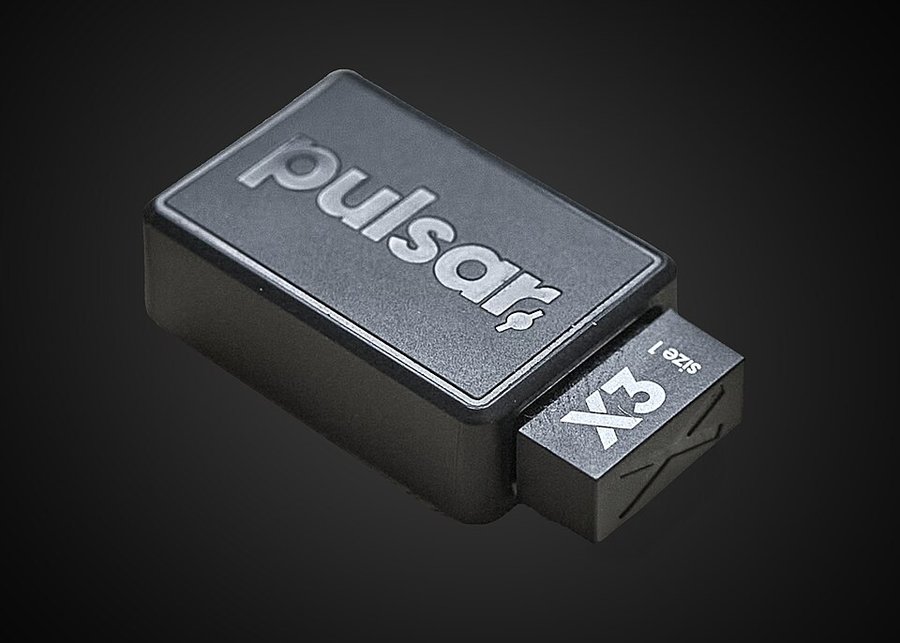
The Pulsar X3 is a wireless gaming mouse with a right-handed shape that is part ergonomic, part symmetrical. It is aimed at players who use a palm or claw grip and want a light mouse with a high-end sensor.
Specs
Connection
Wireless, 2.4 GHz via USB receiver
Battery life
Switches or sensor
XS-1 sensor; Kailh optical switches rated for 80 million clicks
Polling rate and DPI
1000 Hz standard, up to 8000 Hz with a separately sold dongle; 32,000 DPI
Weight
55 g (± 1 g)
Layout and buttons
Right-handed hybrid ergonomic shape; 124.7 mm long, 69.5 mm wide, 43.1 mm high
Warranty
2 years limited
From the maker's spec page, checked October 5, 2026. A blank row means the maker does not state it.
What the specs mean
55 g is very light for a full-size mouse, so flicking it around in shooters takes little effort. 1000 Hz means the mouse reports its position every millisecond, which is plenty for most people; the 8000 Hz option needs an extra dongle and mostly matters to competitive players on high-refresh monitors. 32,000 DPI is far higher than anyone needs, so you will not run out of sensitivity headroom. Optical switches rated for 80 million clicks should outlast the mouse for normal use.
Compare the X3 with…
Pick up to three. You get a page with just those,
side by side, on the subjects owners raised.
Once the novelty wears off, what keeps this mouse on the desk is that it needs no fussing. One owner who runs it beside a competing mouse notes the other one needs its dongle power-cycled now and then while this one simply works. Charging becomes a fortnightly habit for some. The click sound and scroll wheel draw more praise than complaint, and most who commented on overall satisfaction would buy it again; one has already bought a second after five years with the first.
The adjustments are real, though. Battery life divides owners almost evenly: some charge every couple of weeks, others find the runtime short enough that the mouse spends too much time on a cable. Ergonomics and weight balance are also divided, with some describing the balance as more centred than earlier models and others finding the heft too light for their taste. The configuration app gets no positive mentions at all, and the low polling rate is something office users say they never notice and gamers say they cannot ignore. Whether it is worth upgrading from an older model is a question owners argue with themselves about; several say a still-working previous version is hard to justify replacing.
Reliability & repairs
The core electronics hold up. Accounts of multi-year units mostly describe the sensor, buttons and wireless still working, with wear showing on the surface instead: the faceted texture in the rubber softens over time, and the coating is divided territory, with some owners finding it fine and others reporting it turns sticky or ugly. One long-term owner replaced theirs only after the scroll wheel stopped free-spinning and the surface had degraded, not because it stopped working. Customer support is a concern: the few who needed it mostly came away unhappy.
The long-term record is thinner than the total account count suggests. Only a modest number of owners describe years of use, and several of those accounts are tangled up with comparisons to other mice from other makers, so the clean multi-year evidence for this specific model is limited. Treat the durability praise as encouraging rather than settled.
More detail What owners praise, where they are split, and the
follow-up timeline
What owners praise
build quality23 of 38who raised it
gesture controls6 of 6who raised it
feel comparison3 of 5who raised it
Where owners have concerns
polling rate10 of 16who raised it
scroll wheel9 of 15who raised it
coating durability7 of 11who raised it
customer support7 of 9who raised it
software reliability6 of 7who raised it
Where owners are split
click feel12 for · 6 against · 3 mixedof 21 who raised it
ergonomics10 for · 7 against · 2 mixedof 19 who raised it
battery life7 for · 6 against · 0 mixedof 13 who raised it
upgrade value3 for · 4 against · 5 mixedof 12 who raised it
weight balance4 for · 4 against · 4 mixedof 12 who raised it
button customization2 for · 4 against · 3 mixedof 9 who raised it
mouse shape2 for · 5 against · 2 mixedof 9 who raised it
mouse weight4 for · 4 against · 0 mixedof 8 who raised it
durability3 for · 3 against · 2 mixedof 8 who raised it
software compatibility3 for · 1 against · 3 mixedof 7 who raised it
scroll wheel design2 for · 1 against · 1 mixedof 4 who raised it
brand loyalty2 for · 1 against · 1 mixedof 4 who raised it
reliability2 for · 2 against · 0 mixedof 4 who raised it
color options1 for · 1 against · 2 mixedof 4 who raised it
Counted from the owners who raised each subject, not from everyone. A subject is judged once at least 4 owners raise it.
21 more subjects came up from fewer than 4 owners each, which is not enough for a fair reading. To see how it stacks up, compare it with another machine.
Does it still kick?
The same owner, asked again at each point. Fills in as owners answer.
Own this one?
Two questions: how long you have had it, and anything you would
like to say about it. Then we ask again as it ages. This helps our
mission.
Still good used? What a used buyer should know, from owners a year or more in
Among the 0 owner accounts here that gave a duration, 0 described a failure.
Before you buy one used, ask the seller: how old it is, whether it was ever repaired and by whom, and whether any of the parts above have been replaced. Ask to see it run. A receipt tells you the warranty start date; most makers honour the term only for the first owner.
Where this came from
Where this came from
Public discussions we read and summarised in our own
words. Nothing here was submitted to Still Kicks.
Counted from public accounts by people who said they own it, and summarised by Still Kicks in its own words. Not a manufacturer claim, a lab test or an estimate.
No account needed to look. Sign in with Google only if you want to track something you own.