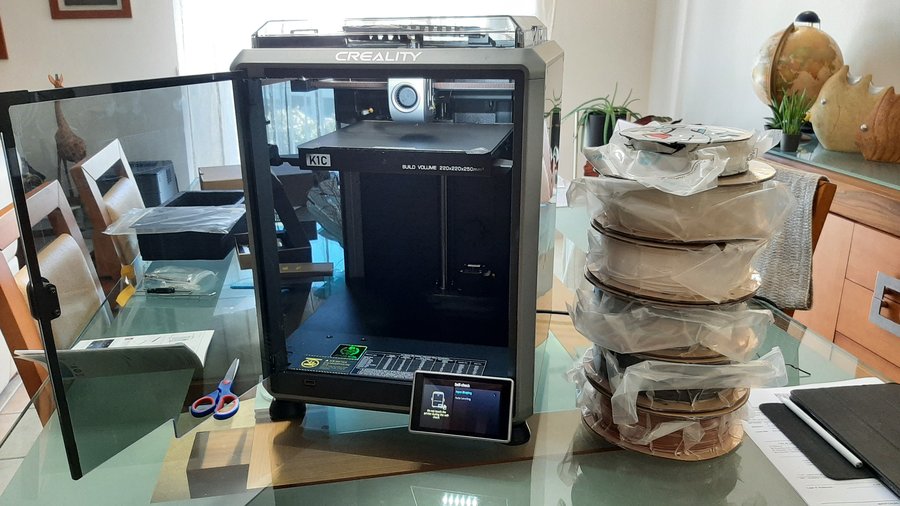
Owners keep the K1C as a dependable everyday printer that turns out clean parts for the house and workshop, and most would buy it again, even those who wish the 2025 model could be rooted.
Read from 45 owner accountsUpdated September 24, 2026Owner rating: none yetAdd yoursCompare it
What keeps coming up
Print quality is the thing owners point to most, and nearly everyone who raised it was pleased: clean parts for practical household jobs, custom-designed pieces and toys, with one owner still happy with results after roughly two thousand hours.
The clearest complaint is root access: owners of the 2025 revision say it cannot be unlocked, and fitting the CFS multicolor unit closes off rooting on older machines too, which frustrates people who want to run their own firmware or outside slicers.
The Creality K1C is a fast desktop 3D printer that melts plastic filament and builds objects layer by layer. It is designed to handle carbon-fibre filled filaments as well as common ones like PLA, PETG, ABS and TPU. It suits hobbyists and makers who want quick prints at home without much setup.
Specs
Build volume
220 x 220 x 250 mm
Printer type
FFF (filament), CoreXY
Max speed
600 mm/s
Nozzle temperature
300 °C max
Bed temperature
100 °C max
Enclosure
Auto bed levelling
Yes, hands-free auto levelling
Warranty
From the maker's spec page, checked October 7, 2026. A blank row means the maker does not state it.
What the specs mean
220 x 220 x 250 mm: the biggest single part it can print is about the size of a large mug or a small shoebox. 600 mm/s is the top speed. Real prints usually run slower, but it is still much quicker than older budget printers. A 300 °C nozzle and 100 °C bed are hot enough for tougher plastics like ABS, ASA and nylon-carbon blends, as well as PLA and PETG. With automatic levelling, you don't have to adjust the bed by hand before printing.
Compare the K1c with…
Pick up to three. You get a page with just those,
side by side, on the subjects owners raised.
Once the novelty wears off, the K1C settles into being a workhorse. Owners describe printing useful things week after week, from mounts and organisers for baby gear to custom seed plates for farm equipment, and one owner who moved up from an Ender 3 never looked back. Several treat it as a value buy: a few tweaks and a bit of tinkering now and then are accepted as part of the deal, and at its price they feel it competes well above its class.
Multicolor is where owners are divided. Some are delighted to finally print colourful toys and nicer-looking parts, and like being able to leave filament loaded so a spool swaps in automatically when one runs out. Others find the purge tower on the CFS unit is fixed at a large size and cannot be shrunk without the printer rejecting the file, and one owner who converted to a multi-material setup rarely uses it because of the waste. Root access is the other adjustment: 2025 owners have to accept a locked machine, and some are still waiting on Creality to publish firmware and CFS details so unlocked builds are possible.
Reliability & repairs
The long-term accounts that exist are mostly good. One owner coming up on two years describes very little downtime, with a single nozzle replacement after well over a thousand hours and one encounter with a blob of filament on the hotend as the only real trouble. Another has passed roughly two thousand hours and still rates both quality and reliability highly. A 2025 owner reports no issues at all apart from the missing root. On the other side, one owner had the head repeatedly crash into the bed, damaging the nozzle and build plate; Creality sent replacement parts and blamed software. Complaints about the CFS add-on and about support cluster around firmware for that unit never arriving in fully working form, and one owner says updates on a friend's earlier K1 could brick the machine and had to be rolled back.
Only a handful of owners have written about how the K1C holds up over time, so treat this as early signal rather than a settled record. What is there points to a machine that keeps running with routine nozzle swaps, with the weak spots so far being the multicolor upgrade and Creality's follow-through on its firmware, not the printer itself.
Lifespan
When it breaks2 of 11 accounts describe a failure, at a median of 12 months.
What breaks firstNamed most: extruder (1 of 2), print bed alignment and hotend (repeated repairs) (1 of 2).
Still going8 say theirs still works after a year or more. The longest: 2 years.
More detail What owners praise, where they are split, and the
follow-up timeline
What owners praise
reliability5 of 8who raised it
print quality5 of 7who raised it
multicolor printing3 of 5who raised it
Where owners have concerns
root access3 of 5who raised it
Counted from the owners who raised each subject, not from everyone. A subject is judged once at least 4 owners raise it.
19 more subjects came up from fewer than 4 owners each, which is not enough for a fair reading. To see how it stacks up, compare it with another machine.
Does it still kick?
The same owner, asked again at each point. Fills in as owners answer.
Own this one?
Two questions: how long you have had it, and anything you would
like to say about it. Then we ask again as it ages. This helps our
mission.
Still good used? What a used buyer should know, from owners a year or more in
Among the 11 owner accounts here that gave a duration, 2 described a failure. Parts named most: extruder, print bed alignment and hotend (repeated repairs).
Before you buy one used, ask the seller: how old it is, whether it was ever repaired and by whom, and whether any of the parts above have been replaced. Ask to see it run. A receipt tells you the warranty start date; most makers honour the term only for the first owner.
Where this came from
Where this came from
Public discussions we read and summarised in our own
words. Nothing here was submitted to Still Kicks.
Counted from public accounts by people who said they own it, and summarised by Still Kicks in its own words. Not a manufacturer claim, a lab test or an estimate.
No account needed to look. Sign in with Google only if you want to track something you own.