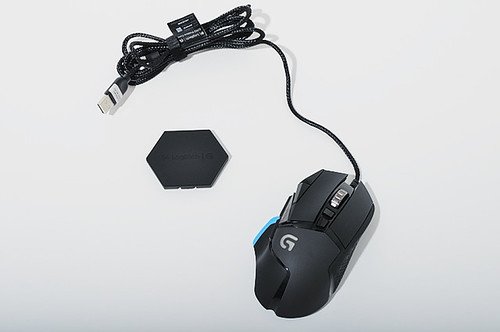
Owners keep the G502 for a shape that fits the hand and a bank of extra buttons they map to games and work, accepting a heft that divides them.
Read from 186 owner accountsUpdated September 26, 2026Owner rating: none yetAdd yoursCompare it
What keeps coming up
The shape is what people stay for: owners describe it fitting their hand well enough to use for years, some for a decade, with the thumb rest and long click buttons suiting a palm grip.
The polling rate is the clearest complaint: owners describe it as too slow for gaming, visible cursor skipping across large monitors, and click latency they could not bring down. One owner was startled to find it running at 100Hz on a mouse at this price.
The Logitech G502 HERO is a wired gaming mouse for right-handed players who like a large, heavy mouse with many buttons. It has a HERO 25K sensor, 11 buttons you can set up yourself, and small weights you can add or take out to change how it feels.
Specs
Connection
Wired (USB)
Battery life
Switches or sensor
Mechanical switches; HERO 25K sensor (400+ IPS)
Polling rate and DPI
100 to 25,600 DPI; up to 5 DPI settings stored
Weight
121 to 139 g (4.27 to 4.90 oz), depending on added weights
From the maker's spec page, checked October 5, 2026. A blank row means the maker does not state it.
What the specs mean
It plugs in with a cable, so you never need to charge it. With a top setting of 25,600 DPI, the sensor is far more sensitive than most people will ever use. Most players set it much lower, and the button lets you switch between up to five speeds. At 121 to 139 g it is a heavy mouse, so it feels steady but takes more effort to flick quickly. Logitech's G502 X, at 89 g wired, is a lighter option.
Compare the G502 with…
Pick up to three. You get a page with just those,
side by side, on the subjects owners raised.
What lasts is the fit. Owners who have used it for years talk about the ergonomics first, the extra buttons second, and say the mouse served them well through shooters and survival games. Button customization draws no complaints at all in these accounts; people assign the extra buttons and keep them.
The weight is the thing everyone has an opinion on, and the opinions are divided. Some owners never noticed it, kept all the weights in, and call it one of the best mice they have bought. Others say the heft makes fast flicks imprecise and moved to lighter mice once they tried one. The G502 has become a running joke in lightweight-mouse circles for this, and owners who love it know that. Grip comfort splits the same way: the long click buttons suit some hands and not others, and a few mention the ring finger getting pinched on the right button.
Reliability & repairs
The sensor and shape hold up; the switches are the weak point. Double clicking is raised by every owner who mentions it, typically showing up after two to three years, and in one case within a day on a wireless unit. Logitech replaced one under warranty, and that replacement started doing the same thing near the three year mark. One owner swapped in cheap third-party switches and has run them for close to five years. Beyond the switches: the rubber side grips wear or collect grime, the skates can come loose (one owner pressed them back in and kept going), and the body has cavities that gather dust. Customer support gets more criticism than praise in the few accounts that mention it.
Long-term accounts are real but not deep. Several owners report five to ten years of use, and more of them call the mouse durable than not, but the number describing any single failure is small. Take the pattern (switches fail, most everything else lasts) as well supported, and the timing as rough.
Parts named in the 15 accounts that describe a failure
switch5 of 15
button2 of 15
left click2 of 15
clicks1 of 15
scroll wheel1 of 15
More detail What owners praise, where they are split, and the
follow-up timeline
What owners praise
durability10 of 14who raised it
ergonomics8 of 12who raised it
button customization8 of 9who raised it
weight balance5 of 6who raised it
Where owners have concerns
polling rate10 of 12who raised it
double click issue10 of 10who raised it
switch reliability7 of 11who raised it
software reliability4 of 4who raised it
customer support3 of 4who raised it
Where owners are split
mouse weight15 for · 17 against · 5 mixedof 37 who raised it
build quality9 for · 9 against · 2 mixedof 20 who raised it
scroll wheel3 for · 6 against · 4 mixedof 13 who raised it
mouse shape4 for · 5 against · 2 mixedof 11 who raised it
sensor performance3 for · 3 against · 2 mixedof 8 who raised it
brand loyalty3 for · 1 against · 3 mixedof 7 who raised it
grip comfort2 for · 3 against · 1 mixedof 6 who raised it
button layout2 for · 1 against · 2 mixedof 5 who raised it
battery life2 for · 1 against · 1 mixedof 4 who raised it
click feel2 for · 2 against · 0 mixedof 4 who raised it
Counted from the owners who raised each subject, not from everyone. A subject is judged once at least 4 owners raise it.
13 more subjects came up from fewer than 4 owners each, which is not enough for a fair reading. To see how it stacks up, compare it with another machine.
Does it still kick?
The same owner, asked again at each point. Fills in as owners answer.
Own this one?
Two questions: how long you have had it, and anything you would
like to say about it. Then we ask again as it ages. This helps our
mission.
Still good used? What a used buyer should know, from owners a year or more in
Among the 31 owner accounts here that gave a duration, 15 described a failure. Parts named most: switch, button, left click, clicks.
Before you buy one used, ask the seller: how old it is, whether it was ever repaired and by whom, and whether any of the parts above have been replaced. Ask to see it run. A receipt tells you the warranty start date; most makers honour the term only for the first owner.
Where this came from
Where this came from
Public discussions we read and summarised in our own
words. Nothing here was submitted to Still Kicks.
Counted from public accounts by people who said they own it, and summarised by Still Kicks in its own words. Not a manufacturer claim, a lab test or an estimate.
No account needed to look. Sign in with Google only if you want to track something you own.