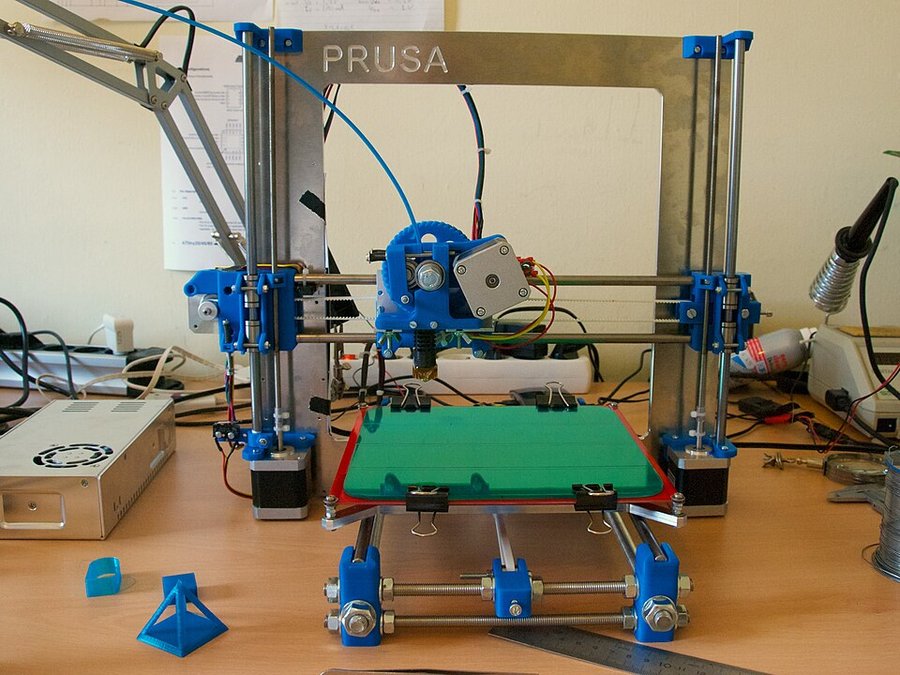
Owners keep their i3 machines running for years as dependable workhorses, and the trade-off they keep accepting is speed: newer printers finish jobs faster.
Read from 56 owner accountsUpdated October 9, 2026Owner rating: none yetAdd yoursCompare it
What keeps coming up
Reliability is clear praise. Owners describe machines that just keep working, such as an MK3 bought in 2018 and upgraded to an MK3S+ with MMU2S that has been a steady workhorse ever since, and an Anycubic i3 Mega that still runs with no issues.
Print speed is a clear concern. Owners who are happy with their i3 still buy newer machines because those print faster, and one owner running Klipper on an i3 Mega advises against going above 100mm/s.
The Original Prusa i3 MK3S+ is a desktop 3D printer from Prusa Research, a company in Prague. It builds objects by melting 1.75 mm plastic filament and laying it down in thin layers. It is for hobbyists, makers and small workshops, and comes either assembled or as a kit you build yourself.
Specs
Build volume
25 x 21 x 21 cm (9.84 x 8.3 x 8.3 in)
Printer type
Filament (FDM), direct-drive extruder
Max speed
200+ mm/s (travel)
Nozzle temperature
300 °C / 572 °F max
Bed temperature
120 °C / 248 °F max
Enclosure
Auto bed levelling
Yes, SuperPINDA probe for first layer calibration
Warranty
From the maker's spec page, checked October 8, 2026. A blank row means the maker does not state it.
What the specs mean
The build area is about the size of a shoebox lying on its side, which is room for most household parts, toys and brackets. A nozzle that reaches 300 °C and a bed that reaches 120 °C mean it can print tougher plastics like PETG, ASA, nylon and polycarbonate, not just basic PLA. The sensor that measures the bed before each print helps the first layer stick without you adjusting it by hand. 200+ mm/s is how fast the print head moves between spots, not how fast it prints, and printing is slower than on newer machines.
Compare the i3 with…
Pick up to three. You get a page with just those,
side by side, on the subjects owners raised.
What stays good is that the machine keeps doing its job. Owners talk about the MK3 as a solid machine that mattered more than fancier rivals with color screens, bigger build volumes and built-in networking. Others remember an i3 or i3 clone as the printer that got them into the hobby, one of them building their own clone in the early 2010s, and one bought theirs specifically to make parts for a sim racing motion rig.
What owners adjust to is that it is a tinkerer's machine. One long-time printer contrasts it with a Bambu P1S that behaves like an appliance and needs almost no troubleshooting. Print quality comes up in too few accounts to judge, and they are divided: one owner never got good results from an i3 Mega S despite upgrades, and another found a newer printer gave far better prints. Owners on the older MK3 are now moving to the Core One or Core One L, though one expects the new machine to take over most of the work rather than replace the MK3 outright.
Reliability & repairs
The accounts that cover the long haul describe machines that keep working. An MK3 from 2018 has been upgraded in place to MK3S+ with an MMU2S and is still in service, and an Anycubic i3 Mega owner reports no problems at all, retiring it only for speed. Not every i3-style machine earns that: one owner says their Wanhao Duplicator i3 needed hundreds of dollars in upgrades and still sometimes barely worked.
The long-term record here is thin. Only a handful of owners speak to durability, none describe a specific part failing or a repair, and the accounts mix Prusa's own MK3 with other i3-design printers from Anycubic, Wanhao and home-built clones, so treat this as a small and mixed sample rather than a settled verdict.
More detail What owners praise, where they are split, and the
follow-up timeline
What owners praise
reliability6 of 6who raised it
print quality3 of 4who raised it
Where owners have concerns
print speed3 of 5who raised it
Counted from the owners who raised each subject, not from everyone. A subject is judged once at least 4 owners raise it.
28 more subjects came up from fewer than 4 owners each, which is not enough for a fair reading. To see how it stacks up, compare it with another machine.
Does it still kick?
The same owner, asked again at each point. Fills in as owners answer.
Own this one?
Two questions: how long you have had it, and anything you would
like to say about it. Then we ask again as it ages. This helps our
mission.
Still good used? What a used buyer should know, from owners a year or more in
Among the 0 owner accounts here that gave a duration, 0 described a failure.
Before you buy one used, ask the seller: how old it is, whether it was ever repaired and by whom, and whether any of the parts above have been replaced. Ask to see it run. A receipt tells you the warranty start date; most makers honour the term only for the first owner.
Where this came from
Where this came from
Public discussions we read and summarised in our own
words. Nothing here was submitted to Still Kicks.
Counted from public accounts by people who said they own it, and summarised by Still Kicks in its own words. Not a manufacturer claim, a lab test or an estimate.
No account needed to look. Sign in with Google only if you want to track something you own.